Home Apps Tools Content Transfer
Content Transfer

Content Transfer Rate : 4.0

  • Category : Tools
  • Version : 1.2.18
  • Size : 17.55M
  • Developer : Kevin's Lab
  • Update : Jan 03,2025
Download
Application Description

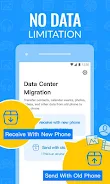
Experience effortless file transfer and phone cloning with Content Transfer! This app simplifies data migration between iOS and Android, eliminating the need for cumbersome manual transfers or complex cloud solutions. Securely move your apps, contacts, messages, photos, videos, music, and calendars from your old phone to your new one in minutes.

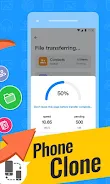
Content Transfer offers blazing-fast speeds up to 40Mbps—200 times faster than Bluetooth—while ensuring your data remains safe and secure. Its intuitive interface makes the process incredibly easy. Simply connect both devices to the same Wi-Fi network, install the app, and follow three straightforward steps to complete the transfer. Choose between direct device-to-device transfer or convenient QR code scanning. Select the data you need, and quickly populate your new phone with all your essential information and cherished memories. Upgrade your device with confidence!

Key Features of Content Transfer:

  • Comprehensive Data Transfer: Transfer apps, contacts, messages, photos, videos, music, calendars, and more.
  • Cross-Platform Compatibility: Seamlessly move data between Android and iOS devices.
  • Ultra-Fast Transfer Speeds: Enjoy speeds up to 40Mbps, 200 times faster than Bluetooth.
  • Secure Data Protection: Your privacy is our priority; transfers are secure and leak-proof.
  • Intuitive User Interface: Complete the phone clone process in three easy steps.
  • QR Code Option: A quick and easy alternative transfer method.

Content Transfer provides a streamlined and efficient solution for file transfer and phone cloning. Its speed, security, and user-friendly design guarantee a smooth experience. Download now and experience hassle-free data transfer!

Screenshot
Content Transfer Screenshot 0
Content Transfer Screenshot 1
Content Transfer Screenshot 2
Content Transfer Screenshot 3
Latest Articles More
  • Seven Deadly Sins: Origin Release Details

    Closed Beta Test from October 30 to November 5The Closed Beta Test is scheduled to take place from October 30th through November 5th. Although official registration for the test has concluded, there is still an opportunity for players who missed the

    May 02,2026
  • MK1: Homelander and Omni-Man Get Unique Moves

    During a Gamescom interview, Mortal Kombat co-founder Ed Boon explained how Mortal Kombat 1 will distinguish its versions of Omni-Man and Homelander, detailing NetherRealm's approach to making them feel like two distinct characters.Ed Boon Confirms H

    May 01,2026
  • A Beginner’s Guide to Palmon Survival

    Palmon: Survival is a genre-blending adventure that combines monster-catching with base-building, automation, and real-time combat. Whether you love city simulators, creature battlers, or sandbox survival games, this guide will help you begin your jo

    Apr 29,2026
  • Stumble Guys honours young fan with new wheelchair-using character

    Stumble Guys is introducing its first character who uses a wheelchair. This update was inspired by a visit from young fan Fayçal to Scopely’s offices. The design draws from superhero aesthetics and competitive Olympiad-style wheelchairs.Accessibility

    Apr 29,2026
  • Reverse: 1999 to Reveal Exciting New Details on Version 3.2 in Upcoming Livestream

    Bluepoch’s 20th-century time-travel strategic RPG Reverse: 1999 is set to unveil all details for its upcoming major update. The publisher has confirmed that Reverse: 1999 Version 3.2 will be fully revealed during a special global livestream. When is

    Apr 27,2026
  • Origin's Iliana Update Launches Wine Festival

    S-Grade Admiral Iliana Feraios arrives, bringing her own unique story to the seas.The Wine Festival continues until July 8th, unveiling the new Douro Winery village.The Ocean Season Event begins on June 25th, offering players valuable rewards.Followi

    Apr 24,2026