A Symphony of Compatibility and User-Friendly Innovation
Seamless Workflow:
Moises simplifies the music fine-tuning process with a seamless four-step workflow: upload, separate, modify, and download. Users can effortlessly upload audio/video files from their devices, public URLs, Google Drive, Dropbox, iCloud, or even import songs from iTunes and other apps like WhatsApp. This flexibility ensures that Moises seamlessly integrates into various workflows, making it accessible to a wide range of users.
Comprehensive File Format Support:
The app's compatibility extends to diverse file formats, allowing users to work with their preferred audio formats such as MP3, WAV, or M4A. This inclusivity ensures that Moises adapts to the user's existing library without imposing unnecessary constraints.
Device-Agnostic Approach:
Moises's compatibility is not limited to specific devices or operating systems. Whether you're using a smartphone, tablet, or computer, Moises accommodates your platform of choice. This device-agnostic approach enhances the app's accessibility, ensuring that users can harness its power regardless of their preferred hardware.
Public URL Integration:
The ability to extract audio from public URLs enhances Moises' versatility. Users can pull content from various online sources, facilitating collaboration and allowing for the seamless integration of external content into their music-making process.
User-Friendly Interface:
Moises boasts an intuitively designed interface that caters to both novices and experienced musicians. The straightforward navigation and user-friendly controls ensure that users can harness the app's advanced features without a steep learning curve.
Collaboration and Sharing:
The compatibility of Moises extends beyond individual use, making it an excellent tool for collaborative projects. The app's export features allow users to share high-quality audio mixes and separated stems effortlessly. Whether you're working on a collaborative track or sharing your creations, Moises ensures a smooth and efficient sharing experience.
Multilingual AI Support:
The inclusion of AI lyric transcription supporting multiple languages (English, Spanish, Portuguese, French, and Italian) adds a global dimension to Moises. Musicians from different linguistic backgrounds can seamlessly work with the app, breaking down language barriers in the creative process.
Core Features
AI Audio Separation of Stems:
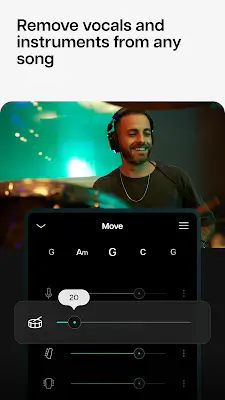
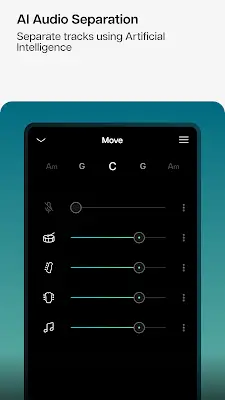
Moises empowers users to easily separate vocals, drums, guitar, bass, piano, strings, and other instruments in any song. This makes Moises an invaluable tool for creating acapella or instrumental backing tracks, providing endless possibilities for creative expression.
Smart Metronome:
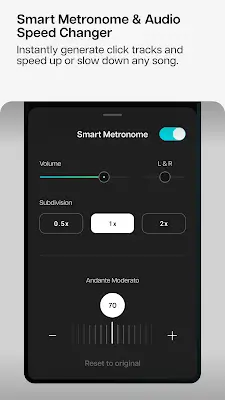
The app includes a smart metronome that generates click tracks perfectly synchronized to the beat of any song. Musicians can adjust click track subdivisions, ensuring precise timing and rhythm in their practice sessions or performances.
AI Lyric Transcription:
Moises simplifies the arduous task of song transcription by converting music into text effortlessly. Supporting multiple languages, users can transcribe lyrics with ease, making it a perfect tool for creating karaoke tracks and enhancing the overall music-making experience.
AI Chord Detection:
Playing along has never been easier with instantly synced guitar tabs and chords. With beginner, intermediate, and advanced chord detection, Moises caters to musicians of all skill levels, facilitating a seamless practice environment.
Audio Speed Changer and Pitch Changer:
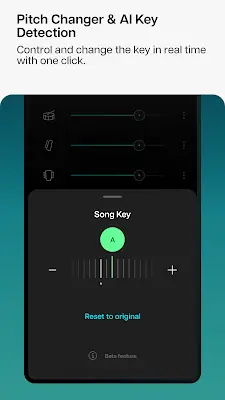
Moises allows users to manipulate audio speed and pitch with just a click. Whether slowing down a challenging section for practice or adjusting the key to match vocal range, these features are indispensable for honing skills and perfecting performances.
AI Key Detection:
Detect and change the song key effortlessly, instantly transposing chords to all 12 keys. This functionality is a game-changer for musicians looking to adapt songs to their preferred keys, enhancing the overall music practice experience.
Export and Playlist Management:
Moises facilitates the easy extraction and sharing of high-quality audio mixes and separated stems. The app also allows users to organize music playlists for efficient practice and live rehearsals.
Count In, Trim, and Loop:
Musicians can set the "count in" period, trim music parts, and loop specific sections for targeted practice. These features are perfect for rehearsals, personal practice, and refining specific elements of a song.
Backing Tracks Creation:
Moises enables the creation of various backing tracks, including acapella, drum, guitar, karaoke, and piano. This versatility caters to a wide range of musical preferences and styles.
Conclusion
Moises emerges as the ultimate music maker, catering to a diverse audience ranging from music lovers and students to professional musicians and content creators. Its AI-driven features, intuitive interface, and powerful tools make Moises an indispensable companion for anyone looking to explore, create, and fine-tune music in unprecedented ways. Join the Moises band today and experience the limitless possibilities of musical expression!