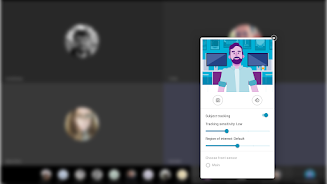
Introducing the Moto Camera Desktop Settings App! Enhance your video calls with customized camera settings while connected to an external screen using the ReadyFor platform.
Stay Centered with Subject Tracking
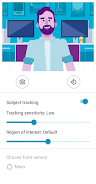
Keep your subjects perfectly centered in the frame with our intelligent subject tracking feature. This smart software can recognize up to 3 faces simultaneously, ensuring everyone stays in focus. Adjust the tracking sensitivity to fine-tune how quickly the camera zooms when someone moves, providing a seamless experience.
Control Your Field of View
Expand the region of interest to capture more of your subjects or narrow it down to include more of the surrounding environment. This gives you the flexibility to tailor your video call to your specific needs.
Choose the Right Camera Sensor
If your front or rear camera has multiple sensors, you can select the one that best suits your situation. This allows you to optimize image quality and clarity for your video calls.
Rotate for the Perfect Angle
Rotate your camera vertically or horizontally to Achieve the ideal perspective for your video call. Whether you're in a portrait or landscape orientation, you can always find the perfect angle.
Download Now and Experience the Difference
Unlock all these amazing Motorola camera settings for your video calls with the Moto Camera Desktop Settings App. Download it today and enjoy a more engaging and personalized video calling experience.
Key Features:
- Customize camera settings for enhanced video calls while connected to an external screen.
- Subject tracking keeps subjects centered in the frame.
- Smart software recognizes up to 3 faces in the same frame.
- Adjust tracking sensitivity to control zooming when a subject moves.
- Increase or decrease the region of interest to include more or less of the field of view with subjects.
- Choose which camera sensor to use when a device has multiple sensors.
- Rotate the camera vertically or horizontally.
Conclusion:
The Moto Camera Desktop Settings App empowers users to easily customize their camera settings for an exceptional video calling experience while connected to an external screen. With features like subject tracking, face recognition, and adjustable tracking sensitivity, this app provides a convenient way to optimize camera settings for video calls. Download now and enhance your video calling experience with Motorola camera settings.