
Home Apps Personalization Navi Auto Start (NAS)
Navi Auto Start (NAS)

Navi Auto Start (NAS) Rate : 4

  • Category : Personalization
  • Version : 1.0.2.001
  • Size : 21.92M
  • Update : Jan 11,2023
Download
Application Description

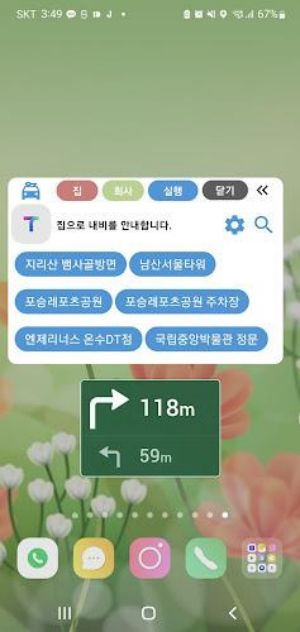
Introducing Navi Auto Start (NAS), the ultimate navigation app assistant! Ever struggled to find your way home or work? With Navi Auto Start (NAS), your daily commute just got a whole lot easier. This app automatically launches your preferred navigation app and guides you to your desired location when connected to power, Bluetooth, or Wi-Fi. Simply set your "home" and "work" addresses, connect your phone to a power source, and let Navi Auto Start (NAS) do the rest. It even allows you to specify your commute/leave time for a customized experience. With features like "Navi Auto Run" and "Popup (Overlay)," navigation has never been more seamless. Plus, with the ability to control app termination and activate/deactivate Wi-Fi, Bluetooth, and more through the Accessibility API, you have full control over your smartphone settings. So say goodbye to the hassle of getting lost and let Navi Auto Start (NAS) guide you effortlessly to your destination every time.

Features of Navi Auto Start (NAS):

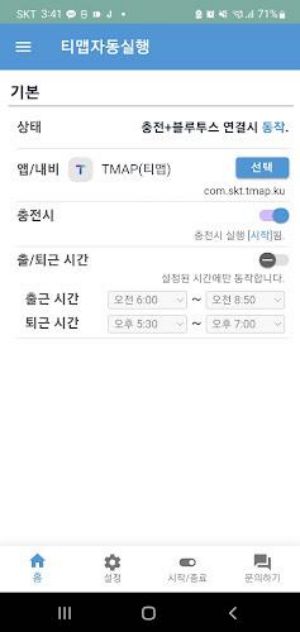
  • Automatic Guidance: The app provides automatic guidance when connected to power, Bluetooth, or Wi-Fi, helping users navigate to their registered "home" and "work" addresses.
  • Seamless Navigation: The app launches the navigation app automatically and closes it when no longer needed, providing a seamless user experience.
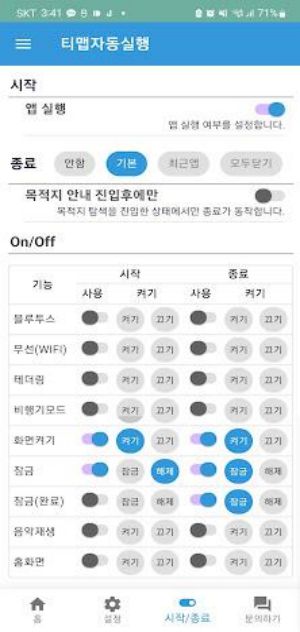
  • Accessibility API Integration: The app utilizes the Accessibility API to control app termination, Wi-Fi activation/deactivation, mobile hotspot activation/deactivation, and notification bar settings.
  • Easy Setup: Users can easily set their "home" and "work" addresses and connect their phone to a power source to start the automatic guidance process.
  • Customization Options: Users can specify their commute/leave time and choose from different guide modes like HomeWork, HomeFavorites, or Driving. They can also adjust settings like the display of the guide icon and the waiting time for the navigation app to start.
  • Run Options: The app can be activated when connected to power (wireless or wired), Bluetooth, or Wi-Fi, providing flexibility for different user preferences.

Conclusion:

This user-friendly app simplifies the navigation process by automatically guiding users to their desired destinations when connected to power, Bluetooth, or Wi-Fi. With its seamless integration with the navigation app and customizable settings, users can easily set up their home and work addresses, specify their preferred guide mode, and enjoy a hassle-free navigation experience. Download the app now and never worry about getting lost again!
Screenshot
Navi Auto Start (NAS) Screenshot 0
Navi Auto Start (NAS) Screenshot 1
Navi Auto Start (NAS) Screenshot 2
Reviews Post Comments
Người dùng Aug 29,2024

Ứng dụng này rất hữu ích, giúp tôi tiết kiệm thời gian khi đi làm mỗi ngày. Tuy nhiên, đôi khi nó hơi chậm.

Autofahrer Aug 22,2024

Super praktisch! Startet meine Navigations-App automatisch und spart mir Zeit. Kann ich nur empfehlen!

Apps like Navi Auto Start (NAS) More+
Latest Articles More
  • Lenovo Legion RTX 4070 Super Gaming PC Returns, $600 Off

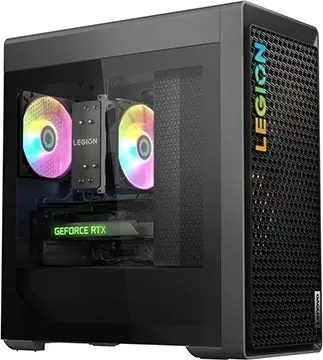
    Lenovo has restocked a highly sought-after gaming desktop configuration. You can currently get the popular Legion Tower 5 with an RTX 4070 Super for $1,472.99, including free shipping, by applying the 5% off coupon code "EXTRAFIVE" in your cart. The

    Oct 06,2026
  • Went wide or long, as a tennis ball Crossword Clue - Try Hard Guides

    We provide the 9-letter solution for "Went wide or long, as a tennis ball," a NYT Crossword clue last featured in the puzzle dated May 16, 2026. Let us assist you in cracking this tricky crossword hint so you can complete your grid with ease.Went wid

    Oct 05,2026
  • Enhance MU Immortal on BlueStacks

    MU Immortal stays true to the core MMORPG experience fans cherish - the rewarding grind for levels, stat optimization, and character progression. While designed for mobile, playing via BlueStacks on PC unlocks powerful tools that enhance every aspect

    Oct 04,2026
  • How to Play Alien Isolation on PC with BlueStacks

    Alien: Isolation delivers classic sci-fi horror to mobile devices through tense stealth mechanics, immersive atmosphere, and the relentless pursuit of a perfect predator. Originally released as a full console and PC title, its mobile adaptation prese

    Oct 04,2026
  • Marvel Rivals Debuts Loki & Hela Kirisaki Skins

    Marvel Rivals has unveiled new Kirisaki-themed outfits for Loki and Hela. Learn all about these upcoming skins and a new online event offering exclusive rewards.Marvel Rivals UpdatesKirisaki-themed Skins for Loki and HelaOn April 21, NetEase announce

    Oct 03,2026
  • Call of Duty: Mobile debuts a new high-seas themed battle pass for season 7, Phantom Current

    Call of Duty Mobile season 7 is launching on July 30th. It brings a brand-new battle pass and a wealth of high-seas-inspired rewards. Gulag makes its debut as a limited-time event, while Mini Mayhem lets you race opponents in RC-XD vehicles. If you'

    Oct 02,2026