Many games launch with optimization issues, later patched. *FragPunk*, however, has enjoyed smooth performance since release, though further frame rate improvements are always possible. This guide details optimal *FragPunk* settings and crosshair codes for enhanced gameplay.
Recommended Videos: FragPunk Settings Overview
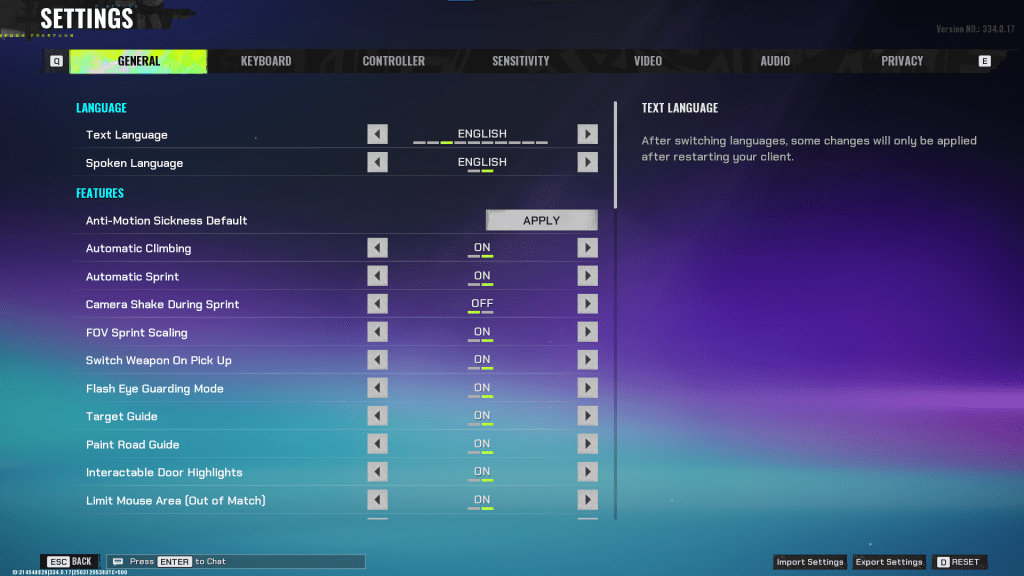
*FragPunk*'s settings are divided into five tabs. Beyond the Video tab, most settings are quality-of-life or accessibility options with minimal performance impact, though some enhance gameplay. We'll highlight those; others can remain at default or adjusted to personal preference.
General Settings
The General tab offers mostly quality-of-life and personal preference options. Experiment to find your ideal setup. These are the settings we recommend adjusting, keeping in mind some personal preference is involved. Crosshair creation, discussed later, is also found here.
Recommended Settings:
- Automatic Climbing – On
- Automatic Sprint – On
- Camera Shake During Sprint – Off
- FOV Sprint Scaling – On
- Flash Eye Guarding – On
- Keep Player Centered – On
- Minimap Orientation Rotate – On
- Performance Metrics – On
- Ping Visibility – 1
- Hide Overly Visible Skin Components from Enemies – On
Keyboard/Controller Settings
Customize your keybinds as desired. A notable suggestion: since Automatic Sprint is enabled, rebind walking to Shift, mirroring common tactical shooters like *VALORANT* and *CS2*.
Sensitivity Settings
Personal preference reigns here. Experiment with different sensitivities or utilize online calculators for conversion from other games like *VALORANT* or *CS2*.
Audio Settings
Adjust Sound Effects to a comfortable level. Lower Music, Announcer, and Button Volume. Enable Character Voice Simplification to remove unnecessary banter. Voice Chat settings are a matter of personal preference.
Related: FragPunk Codes (March 2025)
FragPunk Best Video Settings
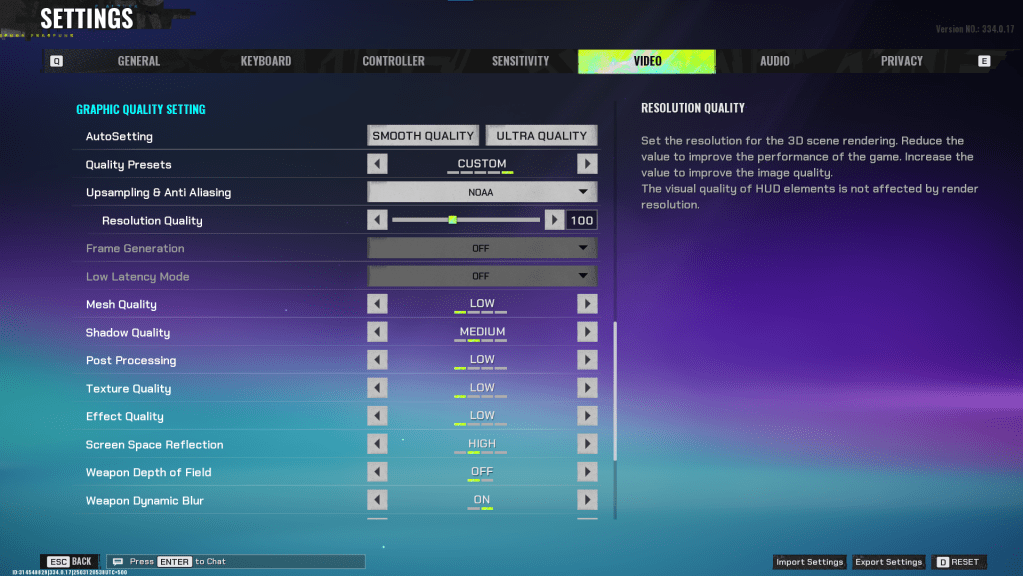
The Video tab significantly impacts performance. These settings prioritize performance over visual fidelity. *FragPunk*’s competitive nature makes frame rate crucial. High-end PCs might tolerate some quality increases, but these are generally the best settings for optimal performance.
Display Settings
| Display Screen | Your Preferred Monitor |
| Display Mode | Fullscreen |
| Display Ratio | Monitor’s Default |
| Display Resolution | Monitor’s Native |
| FOV | 125 |
| Filter | Default or Personal Preference |
| Post Processing Intensity | None or Low |
| Menu Frame Rate Limit | 60 |
| Gameplay Framerate Limit | Monitor’s Refresh Rate |
| Out of Focus Framerate Limit | 60 |
| Brightness | 1 or adjust according to preference |
| Sharpen | Same as Brightness |
| Vertical Sync | Off |
| Antii-tearing | Off |
| Graphics API | Experiment with DX11 and 12 to see what works best with your system |
Minimalistic Graphics Settings
Activating Minimalistic graphics reduces visual effects, yielding a 15-20 fps gain (based on testing), but with noticeable visual downgrades. Consider this trade-off if needed.
| Material Complexity | Minimalistic |
| Light Complexity | Minimalistic |
| Scene Saturation | Minimalistic |
| Effects Complexity | Minimalistic |
| Dead Effect | Off |
| Damage Numbers | On |
| UI Info Simplification | On |
| UI Animation Simplification | Off |
Graphics Quality Settings
| Quality Presets | Custom |
| Upscaling and Anti-Aliasing | Depending on your GPU, choose FSR 2 with Performance for AMD GPUs or NVIDIA Image Scaling with Performance for NVIDIA GPUs. You can also just set it to NOAA with 100% if you don’t want to use any upscaling. |
| Mesh Quality | Low |
| Shadow Quality | Medium |
| Post Processing | Low |
| Texture Quality | Low |
| Effect Quality | Low |
| Screen Space Reflections | High |
| Weapon Depth of Field | Off |
| Weapon Dynamic Blur | On |
| Scene Dynamic Blur | Off |
| Ray Tracing | Off |
| SSGi | On |
| UI Resolution | High. Doesn’t affect in-game FPS. |
| Animation Physical | Off |
FragPunk Best Crosshair Codes
A well-chosen crosshair enhances *FragPunk* gameplay. Here are several options to try:
Classic Plus
azazafzaezaezaezaezfczazaabzaafzazaaabzazaczaczaczaczfcbzbzaabzaafzazaaabzFFFFFFzFFFFFFClassic Dot
czazafzaezagzagzagzfczbzaabziedzazaaabzazaczaczaczaczfcbzbzaabzaafzazaaabzFFFFFFzFFFFFFPrecision Plus
azazafzaezaezaezaezabzazaabziedzazaaabzazaczaczaczaczfcbzbzaabzaafzazaaabzFFFFFFzFFFFFFClassic T Shaped
bzazafzaezaezaezaezabzbzaabziedzazaaabzazaczaczaczaczfcbzbzaabzaafzazaaabzFFFFFFzFFFFFThese are the recommended *FragPunk* settings and crosshair codes. *FragPunk* is available now on PC.