Key Features of TQL Trax:
-
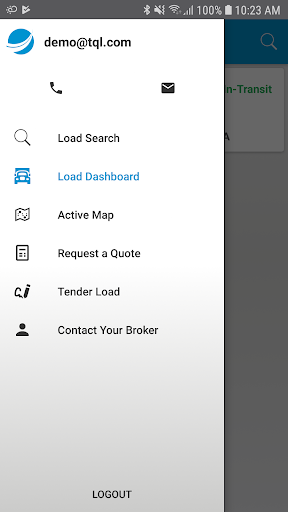
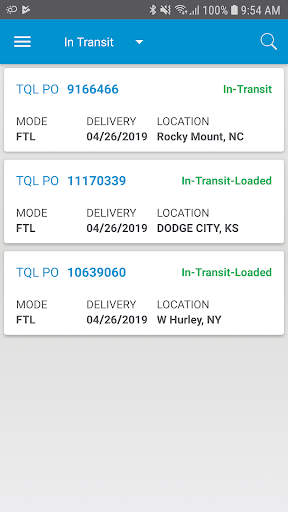
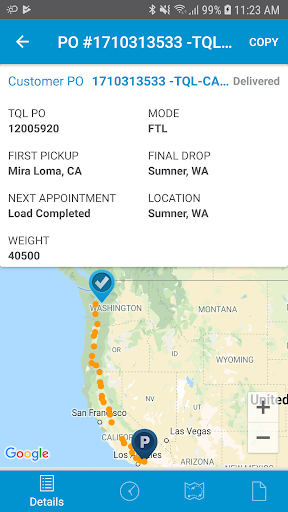
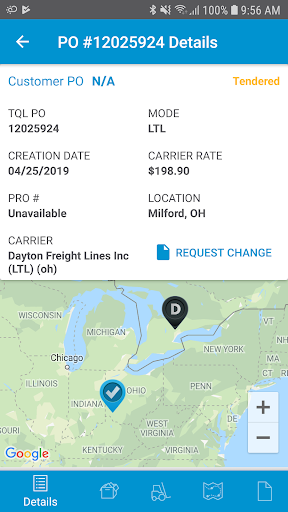
Effortless Load Oversight: Manage your loads with ease thanks to a redesigned, intuitive interface providing instant access to the latest information.
-
Quick Quote Requests: Obtain quotes effortlessly with a few taps on your mobile device, saving time and eliminating the need for phone calls or emails.
-
Simplified Load Tendering: Streamline your shipping process with the app's easy-to-use load tendering feature, leaving behind the complexities of traditional methods.
-
Real-time Tracking: Stay informed with precise, up-to-the-minute mapping status updates, ensuring you're always in the loop.
-
Mobile Accessibility: Manage your loads on the go, anytime, anywhere. The app's features are always at your fingertips.
-
Enhanced User Experience: Navigate the app effortlessly with its intuitive design, quickly finding the information you need for a more efficient workflow.
In Conclusion:
TQL Trax is the definitive solution for efficient and convenient load management. Its streamlined features, including quote requests, load tendering, and real-time updates, provide a hassle-free approach to staying connected with your shipping needs. The app's mobile accessibility and improved user interface make it an indispensable asset for logistics professionals. Download TQL Trax today and simplify your load management process.