
Home Apps Tools Video Rotate Tool
Video Rotate Tool

Video Rotate Tool Rate : 4.2

Download
Application Description

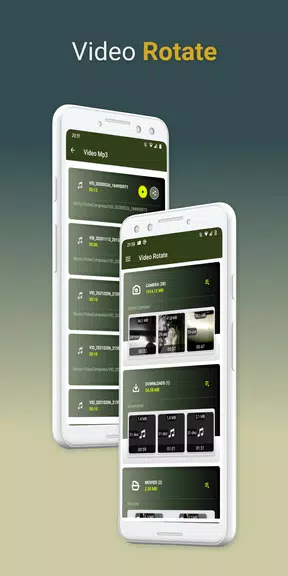
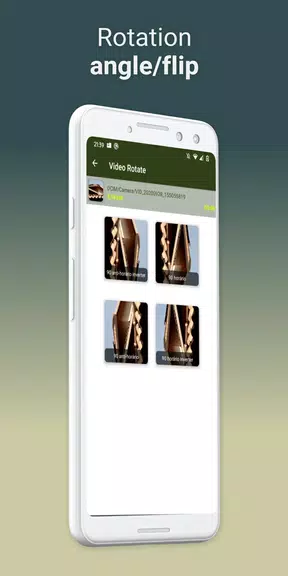
Have you ever recorded a video only to realize it's playing back in the wrong orientation? Say goodbye to sideways or upside-down videos with the Video Rotate Tool app, which allows you to easily rotate any video by 90, 180, 270, or even 360 degrees for fun. With just a few simple steps, you can quickly make a copy of your original video and adjust the orientation without losing quality. Share your rotated videos with friends and keep them organized in the VideoRotate folder on your phone. For even faster rotation, check out the developer's other app, "Video Compress." Rotate your videos with ease and never watch a sideways video again!

Features of Video Rotate Tool:

Easy to Use: Video Rotate Tool makes it simple to rotate your videos with just a few taps, even for beginners.

High-Quality Output: Despite the frame-by-frame rotation process, Video Rotate Tool ensures that your video quality remains intact without any loss.

Shareable Results: Once you've rotated your video, you can easily share it with your friends or on social media platforms.

Tips for Users:

Preview Before Rotating: Before rotating your video, make sure to preview it to determine the correct angle for rotation.

Experiment with Angles: Experiment with different angle options to find the best orientation for your video.

Organize Your Videos: Save your rotated videos to the designated VideoRotate folder for easy access and organization.

Companion App: If you're looking to compress your rotated videos for quicker sharing, try the companion app "Video Compress."

Conclusion:

Video Rotate Tool is the perfect solution for correcting videos with the wrong orientation. With its user-friendly interface, multiple angle options, high-quality output, and easy sharing capabilities, this app is a must-have for anyone looking to effortlessly rotate their videos. Download today and start creating perfectly oriented videos in just a few simple steps.
Screenshot
Video Rotate Tool Screenshot 0
Video Rotate Tool Screenshot 1
Video Rotate Tool Screenshot 2
Latest Articles More
  • Slayaway Camp 2 Launches on iOS, Android

    Following its initial Netflix Games launch in December 2023, the blood-soaked puzzle sequel Slayaway Camp 2 has arrived on iOS and Android platforms. Players can now purchase the game outright through the App Store and Google Play Store, continuing t

    Dec 24,2025
  • Blizzard's Overwatch: Fans Find Joy Again

    Clash Royale players are celebrating as the Inferno Dragon finally gets its long-awaited Evolution form. Nine years after its introduction without evolutionary capabilities, this legendary fire-breather has received a game-changing power boost. To c

    Dec 23,2025
  • PoE 2: Loot Filter Setup for Consoles

    Quick AccessHow to Link Your Path of Exile 2 and Console AccountsFinding and Using Loot FiltersLoot filters are incredibly useful in Path of Exile 2, especially when items begin dropping in large quantities. They minimize on-screen clutter while emph

    Dec 23,2025
  • MageTrain: Pixel Roguelike Hits Android

    Tidepool Games has launched MageTrain, a lightning-fast pixel art roguelike for Android that blends Snake gameplay with auto-battler mechanics. Fans of Nimble Quest will recognize its core inspiration.MageTrain Gameplay ExplainedMageTrain merges Snak

    Dec 22,2025
  • STALKER 2 Patch Rolls Out 1,200 Fixes

    STALKER 2 has just deployed its most substantial patch to date, implementing over 1200 adjustments that resolve nearly every known issue in the game. Here's what this major update improves.STALKER 2 Patch Delivers Over 1200 FixesCombat Balancing, Per

    Dec 22,2025
  • IGN Live 2025: Key Reveals Unveiled

    IGN Live 2025 is officially underway, kicking off a celebration of gaming and entertainment filled with exciting reveals, trailers, interviews, celebrity appearances, and endless surprises. To help you stay updated on all the action, we're compiling

    Dec 22,2025