Home News How To Disable Mouse Acceleration in Marvel Rivals

How To Disable Mouse Acceleration in Marvel Rivals

Author : Jason Jan 21,2025

Mouse acceleration is a major drawback for competitive shooters, and Marvel Rivals is no exception. The game defaults to mouse acceleration with no in-game option to disable it. Here's how to fix that.

Disabling Mouse Acceleration in Marvel Rivals
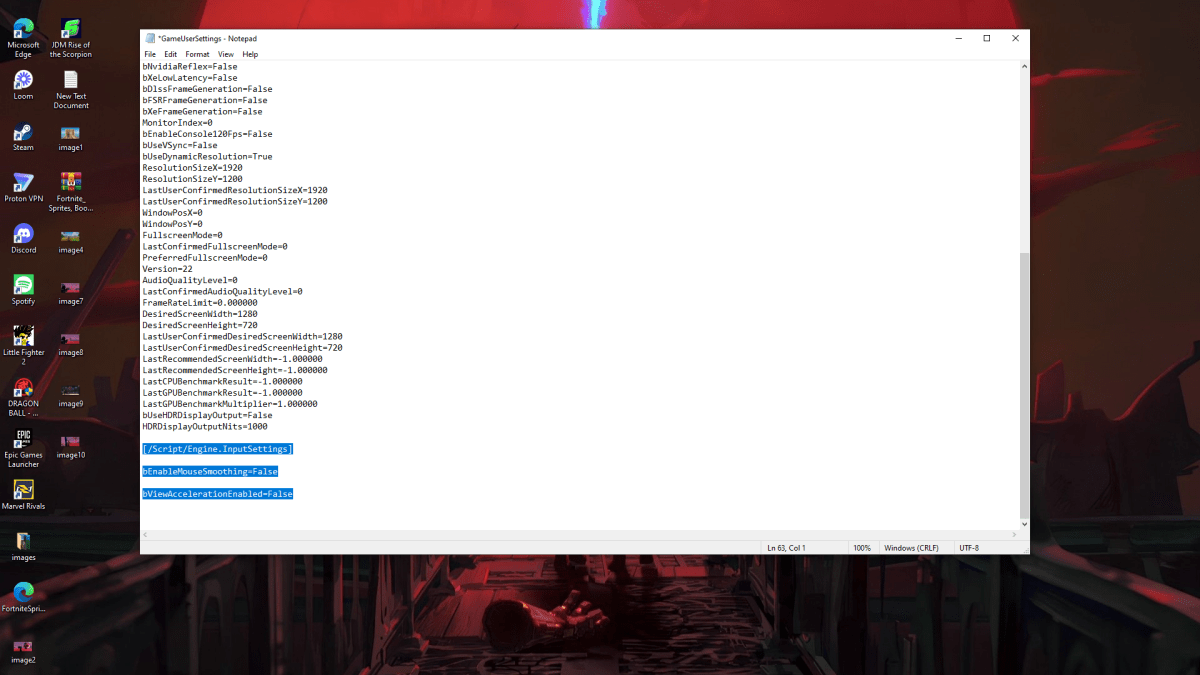
A screenshot of Marvel Rivals Settings demonstrating how to turn off mouse acceleration

Because the game lacks an in-game setting, you'll need to edit a configuration file. It's easy; follow these steps:

  1. Press Windows key + R, then type %localappdata%.
  2. Locate the "Marvel" folder, then navigate to "MarvelSavedConfigWindows".
  3. Open "GameUserSettings.ini" using Notepad (or your preferred text editor).
  4. Add the following lines to the end of the file:
[/Script/Engine.InputSettings]
bEnableMouseSmoothing=False
bViewAccelerationEnabled=False
  1. Save (Ctrl + S), close the file, and then right-click it.
  2. Select "Properties", check the "Read-only" box, and click "Apply" and "OK".

You've now disabled mouse acceleration in the game. Your aim should feel significantly improved.

Disabling Mouse Acceleration in Windows

It's also crucial to disable mouse acceleration in Windows settings:

  1. In the Windows search bar, type "Mouse" and select "Mouse settings".
  2. Click "Additional mouse options" in the top right.
  3. Go to the "Pointer Options" tab.
  4. Uncheck "Enhance pointer precision".
  5. Click "Apply" and "OK".

With mouse acceleration disabled in both the game and Windows, you'll have consistent sensitivity, improving your muscle memory and aim in Marvel Rivals.

Understanding Mouse Acceleration

Mouse acceleration alters your sensitivity based on your mouse movement speed. Fast movements result in higher sensitivity, and slow movements in lower sensitivity. While convenient for general use, this is detrimental to shooters. Consistent sensitivity is key for building muscle memory and accurate aiming.

Marvel Rivals is available now on PS5, PC, and Xbox Series X|S.

Latest Articles More
  • Is inZOI Free? Answered

    Created by inZOI Studio and published by Krafton, inZOI is an engaging life simulation game positioned as a potential rival to EA's The Sims. If you're curious whether inZOI is free to play, here are the essential details. Recommended Vid

    Apr 05,2026
  • Until Dawn Developer Blames 'Challenging and Ever-Evolving Environment' as It Announces Layoffs, Delays Long-Awaited Next Horror Game Directive 8020 Until 2026

    Supermassive Games, the creator of Until Dawn and the Dark Pictures Anthology horror series, has announced it will reduce its workforce by up to 36 employees in a new round of layoffs. In a statement posted to the studio’s social media channels today

    Apr 04,2026
  • Pokémon TCG Pocket Launches Lightning Event

    Pokémon TCG Pocket's latest mass-outbreak event is now liveThis new event spotlights Lightning-type PokémonAcquire cards with distinctive flair and a chance at new ones through Wonder and Rare PicksDedicated Pokémon TCG Pocket players have a lot to l

    Apr 02,2026
  • Nintendo Asked to Pull Game From Switch 2 eShop

    Limited Run Games has requested that Nintendo temporarily halt sales of the Gex Trilogy on the Nintendo Switch 2 eShop, pending clarification on when a patch will be released to resolve a backwards compatibility issue.In a social media announcement,

    Mar 31,2026
  • Nonogram Game Hits 10-Year Mobile Milestone

    A decade ago, Picture Cross launched as "World's Biggest Picture Cross," aspiring to be the definitive nonogram experience on mobile. Today, boasting a collection of over 10,000 puzzles, Picture Cross marks its 10th anniversary with exciting new mode

    Mar 28,2026
  • PG People's Choice Award 2025 nominations open

    While the Pocket Gamer Awards are well-known among gaming enthusiasts, are you aware that our sister site PocketGamer.biz hosts another major event celebrating mobile gaming excellence? The annual PG Mobile Games Awards honors every facet of the indu

    Mar 26,2026