Home News Hyper Light Breaker: How To Play With Friends

Hyper Light Breaker: How To Play With Friends

Author : Aaron Mar 05,2025

Hyper Light Breaker Multiplayer Guide: Co-op with Friends and Random Online Play

Hyper Light Breaker, the 3D rogue-lite successor to Hyper Light Drifter, introduces a compelling multiplayer component. This guide details how to play cooperatively with friends and how to utilize the game's online matchmaking system.

Playing Hyper Light Breaker with Friends
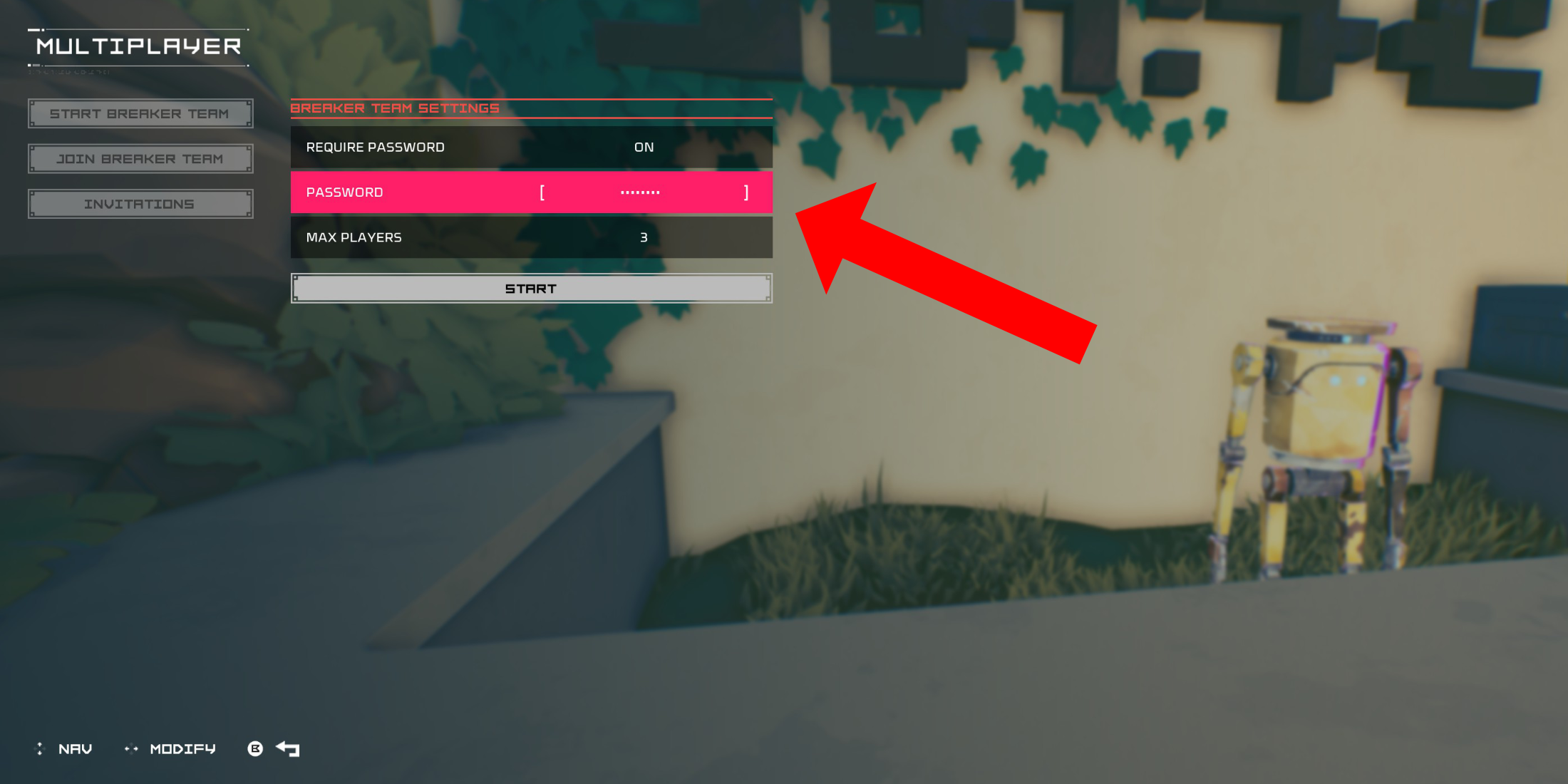
Image: Hyper Light Breaker Multiplayer Menu

To engage in co-op multiplayer with friends, you'll need to create a private multiplayer room. Upon arriving at the Cursed Outpost hub, approach the counter to the left of your commander, Pherus Bit.

Interact with the counter (usually R1 or RB) to access the Multiplayer menu. Here, select "Create Breaker Team."

Enable "Password Required" and set a password. This ensures only invited friends can join your session. Invite up to two friends via your platform's social features (PSN, Xbox, and Steam are supported). Hyper Light Breaker supports groups of up to three players.

Invited friends will receive an in-game notification if they're online. Otherwise, they can join using the invitation link. Your team might also appear in the "Join Breaker Team" list, allowing friends to directly join your private group.

Once your friends accept the invitation (remember to share the password!), you're ready for cooperative gameplay.

Random Online Matchmaking in Hyper Light Breaker
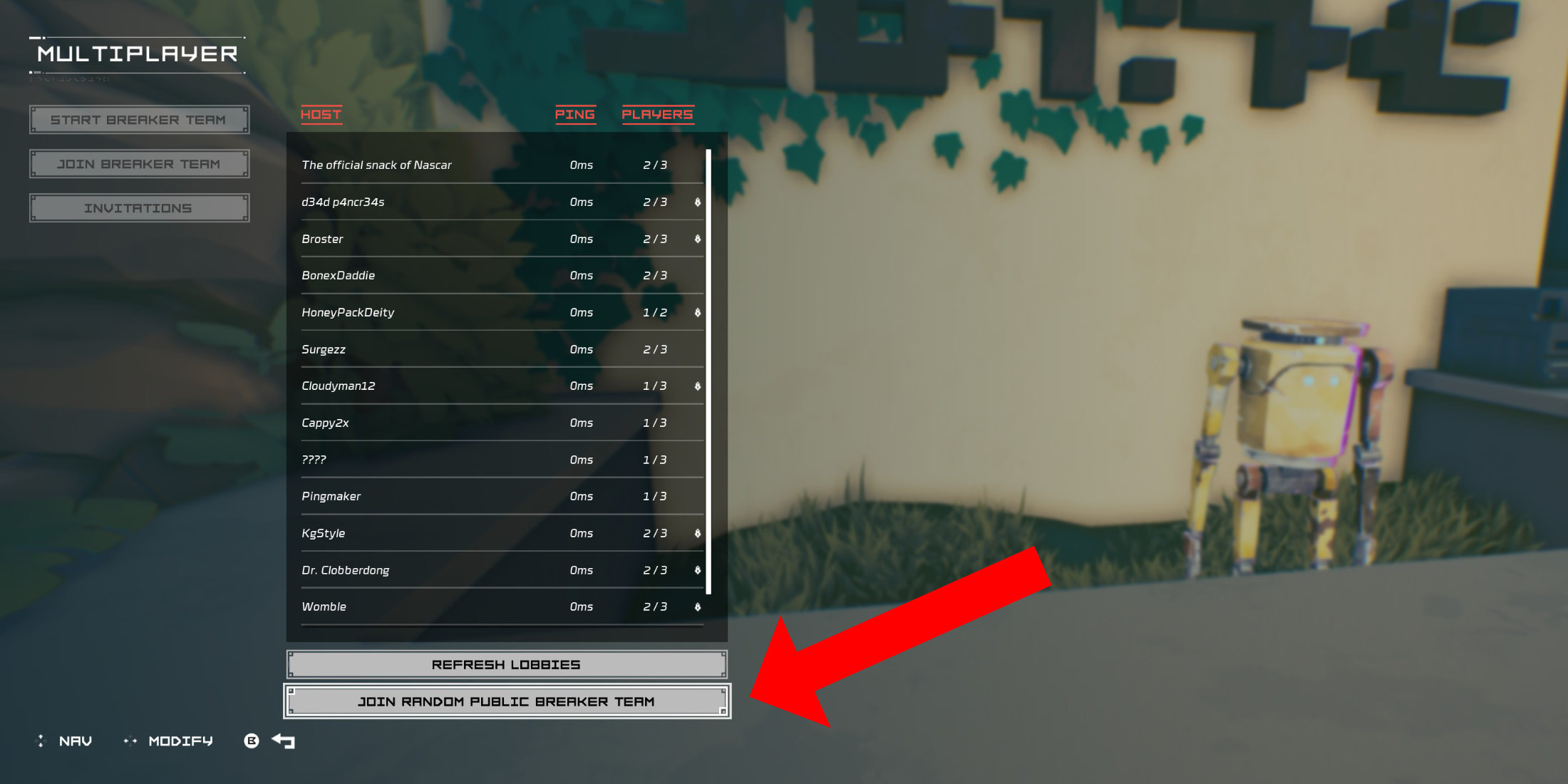
Image: Hyper Light Breaker Join Team Menu

For multiplayer without friends who own the game, Hyper Light Breaker offers public group matchmaking. You can create a public group (without a password) or join an existing one.

In the Cursed Outpost's Multiplayer menu, select "Join Breaker Team." Scroll to the bottom and choose "Join Random Public Breaker Team."

The game will search for available public teams and place you in one, if found. A short loading screen will follow.

To leave a multiplayer session, return to the counter in the Cursed Outpost, open the Multiplayer menu, and select the "Disconnect" option (this appears only when in a multiplayer session). Alternatively, you can simply quit the game.


Latest Articles More
  • Watch Tottenham vs. Man Utd Europa Final Free

    Has there ever been a more dramatic conclusion to a dismal football season? Both Tottenham Hotspur and Manchester United have suffered through disappointing domestic campaigns, languishing in uncharacteristically low league positions.TL;DR: How to wa

    Dec 25,2025
  • Destiny 2, Star Wars Crossover Revealed

    Destiny 2's Year of Prophecy roadmap has been revealed, showcasing a Star Wars-inspired expansion pass. This article breaks down everything coming to the game this year and what each available edition offers.Destiny 2 Year of Prophecy RoadmapRoadmap

    Dec 24,2025
  • Slayaway Camp 2 Launches on iOS, Android

    Following its initial Netflix Games launch in December 2023, the blood-soaked puzzle sequel Slayaway Camp 2 has arrived on iOS and Android platforms. Players can now purchase the game outright through the App Store and Google Play Store, continuing t

    Dec 24,2025
  • Blizzard's Overwatch: Fans Find Joy Again

    Clash Royale players are celebrating as the Inferno Dragon finally gets its long-awaited Evolution form. Nine years after its introduction without evolutionary capabilities, this legendary fire-breather has received a game-changing power boost. To c

    Dec 23,2025
  • PoE 2: Loot Filter Setup for Consoles

    Quick AccessHow to Link Your Path of Exile 2 and Console AccountsFinding and Using Loot FiltersLoot filters are incredibly useful in Path of Exile 2, especially when items begin dropping in large quantities. They minimize on-screen clutter while emph

    Dec 23,2025
  • MageTrain: Pixel Roguelike Hits Android

    Tidepool Games has launched MageTrain, a lightning-fast pixel art roguelike for Android that blends Snake gameplay with auto-battler mechanics. Fans of Nimble Quest will recognize its core inspiration.MageTrain Gameplay ExplainedMageTrain merges Snak

    Dec 22,2025