Home News How to Use Photo Mode in Kingdom Come Deliverance 2

How to Use Photo Mode in Kingdom Come Deliverance 2

Author : Finn Mar 18,2025

Kingdom Come: Deliverance 2 boasts stunning visuals, especially in fidelity mode. But sometimes you just want to pause the action and capture that breathtaking beauty. Here's how to use the in-game photo mode.

Activating Photo Mode in Kingdom Come: Deliverance 2

Unlike some games that add photo mode later—or not at all (we're looking at you, Elden Ring)—Kingdom Come: Deliverance 2 includes it from launch. Here's how to access it:

PC: Press F1 on your keyboard, or press both L3 and R3 simultaneously on a gamepad. Xbox Series X|S / PlayStation 5: Press both L3 and R3 simultaneously on your gamepad. (L3 and R3 refer to pressing down both analog sticks.) Time will freeze, and you'll be in photo mode!

Using Photo Mode in Kingdom Come: Deliverance 2
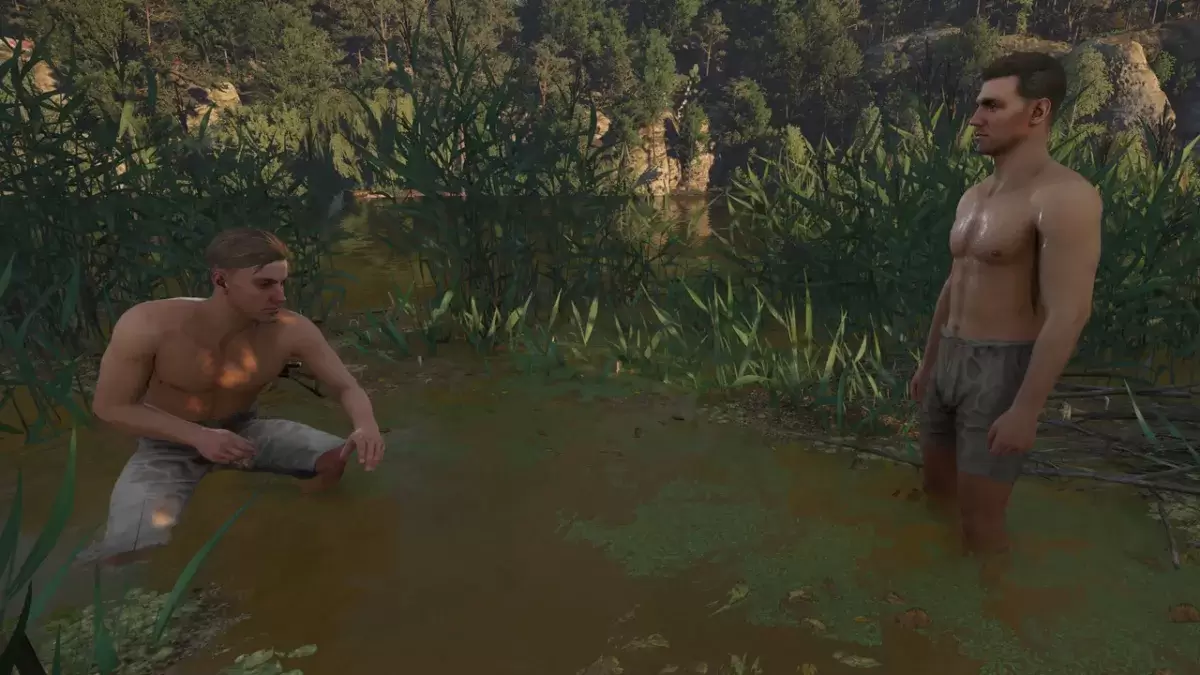
Hans and Henry in Kingdom Come: Deliverance 2, with Henry crouching in the reeds, and Henry standing, both in their pants.

Now that you're in photo mode, let's explore the controls:

Xbox Series X|S:

  • Rotate camera: Left Stick
  • Move camera horizontally: Right Stick
  • Move camera up: Left Trigger/LT
  • Move camera down: Right Trigger/RT
  • Hide Interface: X
  • Exit photo mode: B
  • Take picture: Press the Xbox button, then Y.

PlayStation 5:

  • Rotate camera: Left Stick
  • Move camera horizontally: Right Stick
  • Move camera up: Left Trigger/LT
  • Move camera down: Right Trigger/RT
  • Hide interface: Square
  • Exit photo mode: Circle
  • Take picture: Press the Share button and select "Take Screenshot" (or hold down Share).

PC (keyboard and mouse):

  • Move camera: Use your mouse.
  • Slow move: Caps Lock
  • Hide interface: X
  • Exit photo mode: Esc
  • Take picture: E

On PC, screenshots are saved to your Pictures folder. On consoles, they're saved to your console's capture gallery.

Limitations of Kingdom Come: Deliverance 2's Photo Mode

While the photo mode is a welcome addition, its functionality is currently quite basic. You can freely move the camera around Henry within a certain radius, zoom in and out, but advanced features like character posing, color grading, time manipulation, or the inclusion of other characters are absent. Hopefully, Warhorse Studios will expand these options in future updates. For now, it's a simple but functional tool for capturing the game's beautiful scenery.

Latest Articles More
  • Pixel Saga: Master Faster Game Progress

    Endless Grades: Pixel Saga elevates the classic gacha and idle RPG experience with charming pixel art, a Norse mythology setting, and player-friendly SSR rates. While its retro aesthetic and intuitive progression loop appeal immediately, the game con

    Dec 26,2025
  • Wuthering Waves Unveils Version 2.5 Preview

    - Version 2.5 launches July 24th- Main storyline progresses with Chapter II Act VII- New Resonator Phrolova joins the rosterFollowing the successful 2.4 update, Wuthering Waves prepares to unveil version 2.5: Unfading Melody of Life on July 24th acro

    Dec 25,2025
  • Designer Behind Pokémon Iconic Logo Unveiled

    Here’s the rewritten HTML content with natural English optimization while preserving all original HTML structure:Receiving an unexpected call from Nintendo of America's president isn't the kind of opportunity you question—you simply answer. That was

    Dec 25,2025
  • Robert Kirkman Reveals Massive Invincible VS Character Roster

    We currently know six playable characters in the fighting game Invincible VS, with more to come. But how many is "more"? Comments from Invincible creator Robert Kirkman in an IGN interview at San Diego Comic-Con 2025 suggest the roster for Invincible

    Dec 25,2025
  • Watch Tottenham vs. Man Utd Europa Final Free

    Has there ever been a more dramatic conclusion to a dismal football season? Both Tottenham Hotspur and Manchester United have suffered through disappointing domestic campaigns, languishing in uncharacteristically low league positions.TL;DR: How to wa

    Dec 25,2025
  • Destiny 2, Star Wars Crossover Revealed

    Destiny 2's Year of Prophecy roadmap has been revealed, showcasing a Star Wars-inspired expansion pass. This article breaks down everything coming to the game this year and what each available edition offers.Destiny 2 Year of Prophecy RoadmapRoadmap

    Dec 24,2025