Home News Disable Crossplay in Black Ops VI for Xbox, PS5

Disable Crossplay in Black Ops VI for Xbox, PS5

Author : Gabriel Feb 12,2025

Crossplay in Call of Duty: Black Ops 6: A Balanced Look at Enabling and Disabling

Cross-platform play has revolutionized online gaming, connecting players across different platforms. However, while unifying the Call of Duty community, crossplay presents certain challenges. This guide explains how to disable crossplay in Black Ops 6 and the implications of doing so.

The Crossplay Dilemma

Disabling crossplay in Black Ops 6 is a decision with both advantages and disadvantages. The primary motivation for disabling it is to create a more level playing field. Console players (Xbox and PlayStation) often prefer to avoid PC players due to the inherent advantages of mouse and keyboard controls, offering superior aiming precision. Furthermore, PC players may have easier access to mods and cheats, impacting fair gameplay despite anti-cheat measures like Ricochet. Disabling crossplay theoretically reduces encounters with cheaters.

However, a significant drawback is the reduction in the player pool for matchmaking. This can lead to longer search times and potentially poorer connections with other players.

How to Disable Crossplay in Black Ops 6
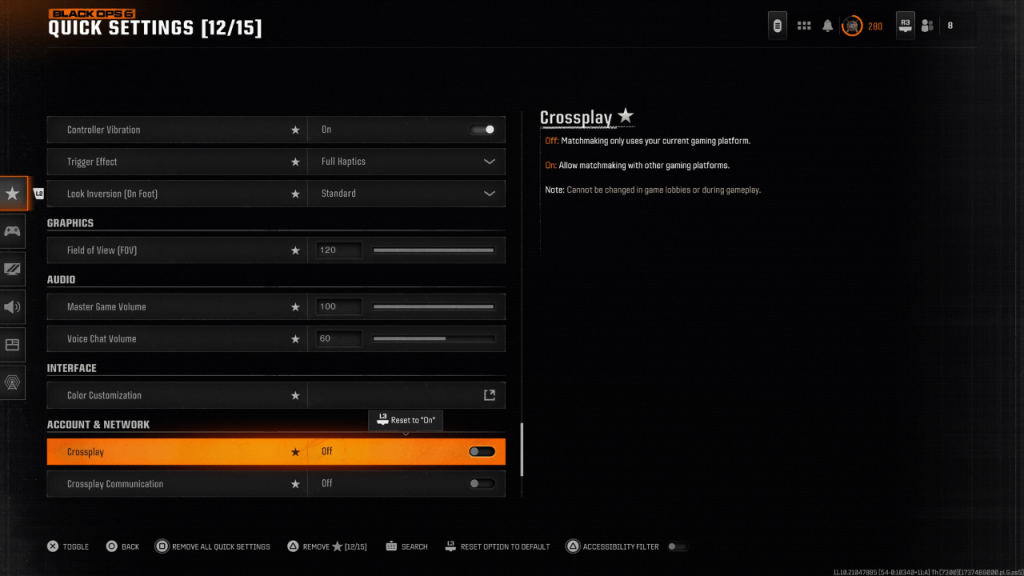
Image: Black Ops 6 Crossplay Settings

Disabling crossplay is relatively simple. Access the Account & Network settings. Locate the Crossplay and Crossplay Communications toggles (often near the top). Toggle the Crossplay setting from "On" to "Off" using the X or A button. This can be done within Black Ops 6, Warzone, or the main Call of Duty menu. Note: The image shows the setting accessed via Quick Settings after being added as a favorite.

Important Note: In some game modes, such as Ranked Play, crossplay may be mandatory. However, this restriction is expected to be lifted in Season 2 of Black Ops 6, offering players more control over their matchmaking experience.

Call of Duty: Black Ops 6 is available on PlayStation, Xbox, and PC.
Latest Articles More
  • RAID Shadow Legends Pity System: Does It Work?

    RAID: Shadow Legends is well known for its reliance on an RNG (random number generator) system for summoning champions. Opening shards can be thrilling, but it’s often disappointing—especially when dozens or even hundreds of attempts yield no Legenda

    Jan 01,2026
  • Ragnarok M: Classic Global Pre-Download Now Live

    Instantly switch between classic character roles on the flySafe equipment refinement up to +15Pre-downloads are now availableAh, Ragnarok—I fondly remember wandering the cobblestone streets of Prontera for hours, the city's theme song lingering in my

    Dec 31,2025
  • Samsung 990 Evo Plus 2TB SSD Discounted for PS5, Gaming PCs

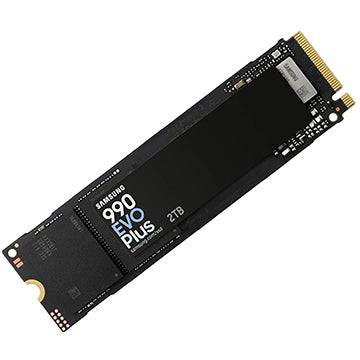
    Samsung's latest SSD, the 2TB Samsung 990 Evo Plus PCIe 4.0 M.2 NVMe solid state drive, is now available at a special price. Today you can purchase it for $129.99, which is even lower than the Black Friday pricing we observed. Currently, it's $40 les

    Dec 31,2025
  • Marvel's New RPG Tasks You With Facing Literal Nightmare

    Assemble a team and collect Marvel characters to join the battlePsylocke and Sentry are now playableLaunch rewards are now availableIf you've been eagerly awaiting the game since the teaser trailer two weeks ago, the wait is finally over - Marvel Mys

    Dec 31,2025
  • Roblox 99 Nights: Beginner Survival Guide

    Roblox's 99 Nights in the Forest blends survival mechanics, exploration, and subtle horror elements into one of the platform's most distinctive experiences. While new players may initially struggle with resource management and enemy encounters, maste

    Dec 30,2025
  • Seven Knights Re:BIRTH Global Pre-Reg Rolls Out

    Netmarble's Beloved RPG Returns With Fresh EnhancementsNetmarble breathes new life into one of its most acclaimed mobile RPG franchises with Seven Knights Re:BIRTH, now open for global pre-registration. The developer has unveiled the first glimpse of

    Dec 30,2025