Home News How To See How Much Money You Spent on Fortnite

How To See How Much Money You Spent on Fortnite

Author : Aiden Jan 05,2025

Track Your Fortnite Spending: A Comprehensive Guide

Fortnite is free, but its enticing skins can lead to unexpected spending. This guide shows you how to monitor your Fortnite expenditures to avoid financial surprises. Knowing exactly how much you've spent is crucial to budgeting effectively.

Why Track Your Spending?

Unmonitored in-game purchases can quickly add up. Stories abound of players unknowingly spending hundreds, even thousands, on microtransactions. Avoid becoming another statistic! This guide provides two methods to check your Fortnite spending.

Method 1: Check Your Epic Games Store Account

All V-Buck purchases are recorded in your Epic Games Store account, regardless of platform or payment method. Follow these steps:

  1. Visit the Epic Games Store website and log in.
  2. Click your username (top right).
  3. Select "Account," then "Transactions."
  4. Scroll through the "Purchase" tab, clicking "Show More" until you reach the end.
  5. Note the V-Buck amounts and their corresponding currency values.
  6. Use a calculator to sum your total V-Bucks and currency spent.

Important Considerations:

  • Free Epic Games Store games will appear in your transactions; scroll past these.
  • V-Buck card redemptions may not show a dollar amount.
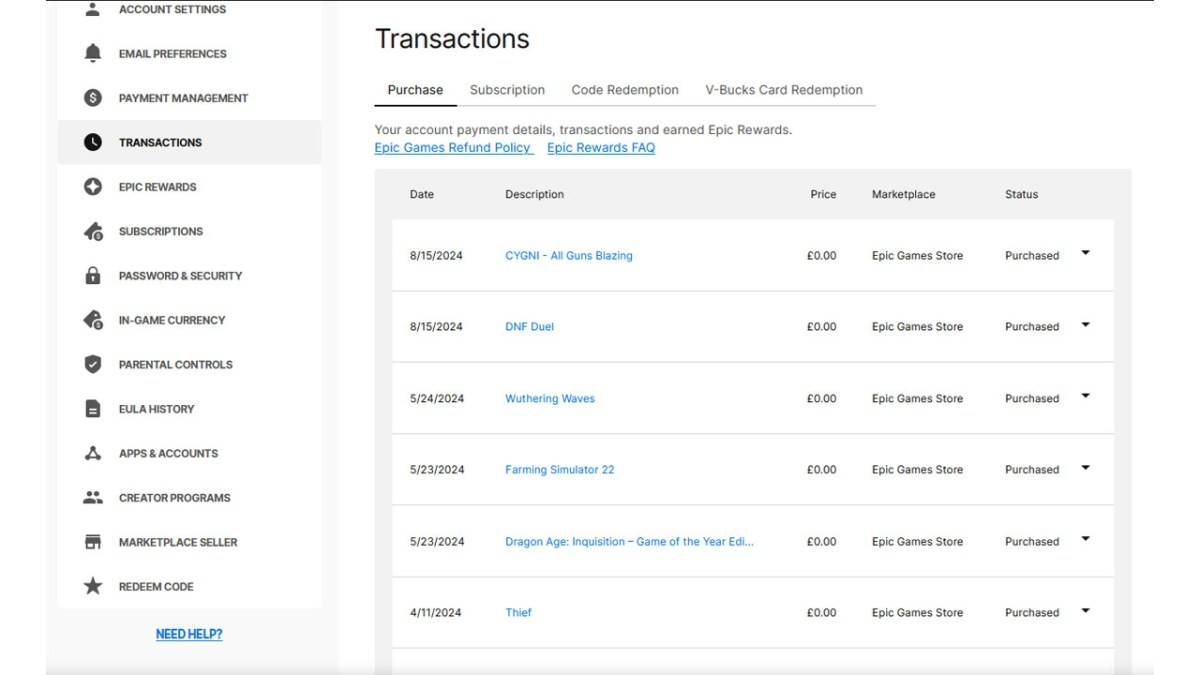
Epic Games transactions page showing Fortnite purchases

Method 2: Utilize Fortnite.gg

Fortnite.gg offers a way to manually track your purchases. While it doesn't automatically detect your spending, you can input your items:

  1. Go to Fortnite.gg and sign in (or create an account).
  2. Navigate to "My Locker."
  3. Manually add each outfit and cosmetic item by clicking on it, then "+ Locker." You can also search for items.
  4. Your locker will display the total V-Buck value of your owned items.
  5. Use a V-Buck to USD converter to estimate your total spending.

Neither method is perfect, but they provide effective ways to monitor your Fortnite spending.

Fortnite is available on various platforms, including Meta Quest 2 and 3.

Latest Articles More
  • Slayaway Camp 2 Launches on iOS, Android

    Following its initial Netflix Games launch in December 2023, the blood-soaked puzzle sequel Slayaway Camp 2 has arrived on iOS and Android platforms. Players can now purchase the game outright through the App Store and Google Play Store, continuing t

    Dec 24,2025
  • Blizzard's Overwatch: Fans Find Joy Again

    Clash Royale players are celebrating as the Inferno Dragon finally gets its long-awaited Evolution form. Nine years after its introduction without evolutionary capabilities, this legendary fire-breather has received a game-changing power boost. To c

    Dec 23,2025
  • PoE 2: Loot Filter Setup for Consoles

    Quick AccessHow to Link Your Path of Exile 2 and Console AccountsFinding and Using Loot FiltersLoot filters are incredibly useful in Path of Exile 2, especially when items begin dropping in large quantities. They minimize on-screen clutter while emph

    Dec 23,2025
  • MageTrain: Pixel Roguelike Hits Android

    Tidepool Games has launched MageTrain, a lightning-fast pixel art roguelike for Android that blends Snake gameplay with auto-battler mechanics. Fans of Nimble Quest will recognize its core inspiration.MageTrain Gameplay ExplainedMageTrain merges Snak

    Dec 22,2025
  • STALKER 2 Patch Rolls Out 1,200 Fixes

    STALKER 2 has just deployed its most substantial patch to date, implementing over 1200 adjustments that resolve nearly every known issue in the game. Here's what this major update improves.STALKER 2 Patch Delivers Over 1200 FixesCombat Balancing, Per

    Dec 22,2025
  • IGN Live 2025: Key Reveals Unveiled

    IGN Live 2025 is officially underway, kicking off a celebration of gaming and entertainment filled with exciting reveals, trailers, interviews, celebrity appearances, and endless surprises. To help you stay updated on all the action, we're compiling

    Dec 22,2025