Home News Best Settings to Reduce Motion Sickness in Avowed

Best Settings to Reduce Motion Sickness in Avowed

Author : Hazel Feb 27,2025

Conquer Motion Sickness in Avowed: Optimal Settings for a Smooth Gameplay Experience

Many players experience motion sickness while playing first-person games. If you're finding Avowed triggers nausea, these settings can help.

Recommended Settings to Minimize Motion Sickness in Avowed

Motion sickness in first-person games often stems from head movement, field of view, and motion blur. Here's how to adjust Avowed's settings:

Eliminating Head Movement and Camera Shake
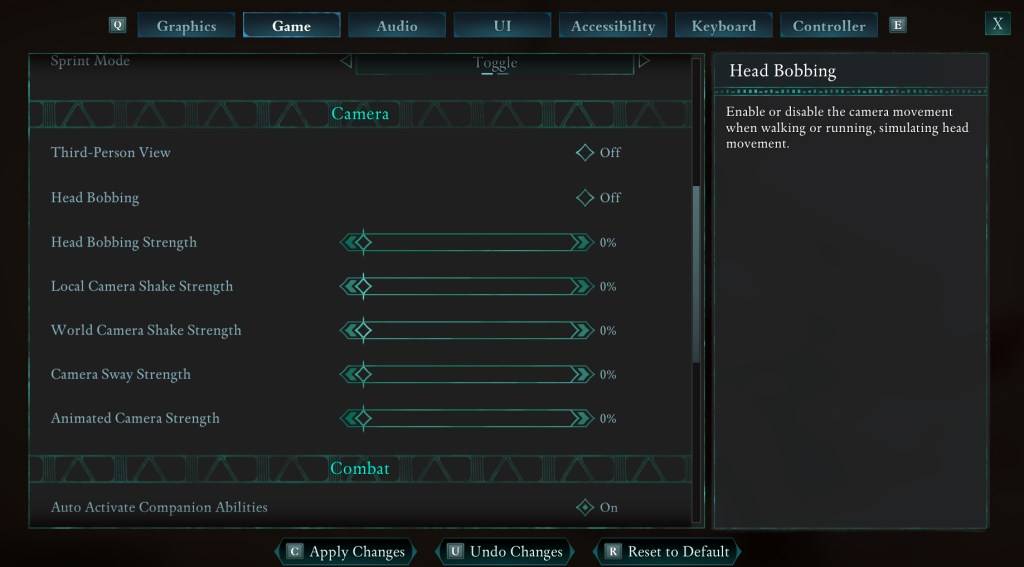
Avowed Settings Menu: Camera Options

To reduce motion sickness, start by minimizing head movement and camera shake. Navigate to Settings > Game > Camera and adjust the following:

  • Third-Person View: Your preference (on or off).
  • Head Bobbing: Off
  • Head Bobbing Strength: 0%
  • Local Camera Shake Strength: 0%
  • World Camera Shake Strength: 0%
  • Camera Sway Strength: 0%
  • Animated Camera Strength: 0%

These adjustments should significantly alleviate motion sickness. Experiment with these settings to find the optimal balance between immersion and comfort.

Optimizing Field of View and Motion Blur
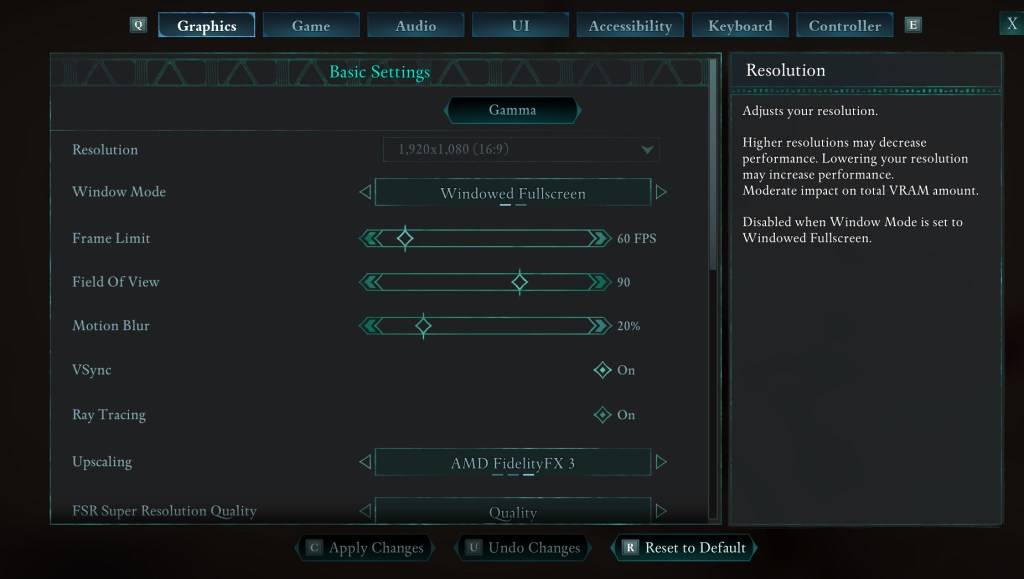
Avowed Settings Menu: Graphics Options

If eliminating head movement isn't enough, further refine your experience by adjusting the graphics settings. Go to Settings > Graphics and modify:

  • Field of View: Start with a lower Field of View and gradually increase it until you find a comfortable level.
  • Motion Blur: Reducing or completely disabling motion blur often helps with motion sickness. Try setting it to zero and adjust as needed.

Persistent Motion Sickness?

If motion sickness persists, continue experimenting with the above settings. Consider switching between first-person and third-person perspectives as needed. If all else fails, take a break, hydrate, and try again later. Don't force yourself to play if you're feeling unwell.

These settings should provide a more comfortable Avowed experience.

Avowed is currently available.

Latest Articles More
  • Watch Tottenham vs. Man Utd Europa Final Free

    Has there ever been a more dramatic conclusion to a dismal football season? Both Tottenham Hotspur and Manchester United have suffered through disappointing domestic campaigns, languishing in uncharacteristically low league positions.TL;DR: How to wa

    Dec 25,2025
  • Destiny 2, Star Wars Crossover Revealed

    Destiny 2's Year of Prophecy roadmap has been revealed, showcasing a Star Wars-inspired expansion pass. This article breaks down everything coming to the game this year and what each available edition offers.Destiny 2 Year of Prophecy RoadmapRoadmap

    Dec 24,2025
  • Slayaway Camp 2 Launches on iOS, Android

    Following its initial Netflix Games launch in December 2023, the blood-soaked puzzle sequel Slayaway Camp 2 has arrived on iOS and Android platforms. Players can now purchase the game outright through the App Store and Google Play Store, continuing t

    Dec 24,2025
  • Blizzard's Overwatch: Fans Find Joy Again

    Clash Royale players are celebrating as the Inferno Dragon finally gets its long-awaited Evolution form. Nine years after its introduction without evolutionary capabilities, this legendary fire-breather has received a game-changing power boost. To c

    Dec 23,2025
  • PoE 2: Loot Filter Setup for Consoles

    Quick AccessHow to Link Your Path of Exile 2 and Console AccountsFinding and Using Loot FiltersLoot filters are incredibly useful in Path of Exile 2, especially when items begin dropping in large quantities. They minimize on-screen clutter while emph

    Dec 23,2025
  • MageTrain: Pixel Roguelike Hits Android

    Tidepool Games has launched MageTrain, a lightning-fast pixel art roguelike for Android that blends Snake gameplay with auto-battler mechanics. Fans of Nimble Quest will recognize its core inspiration.MageTrain Gameplay ExplainedMageTrain merges Snak

    Dec 22,2025