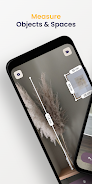
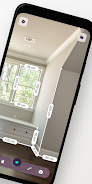
Introducing Measure Tools, the ultimate AR ruler app that lets you measure 2.5 times faster without the hassle of carrying around a physical ruler. With just 2 taps, you can easily measure distances from Point A to Point B. But it doesn't stop there! Our app also offers specialized tools such as accurate measurements even with obstacles, height measurements, object size preview, angle finder, chain measurements, area calculation, and more. You can conveniently save and organize your measurements, share them with others, and even access helpful tips and tricks. Download Measure Tools now and start measuring with ease wherever you go!
Features of Measure Tools - AR Ruler App:
- Fast and Convenient: Measure -5X faster with a ruler that is always with you and never gets lost. Save time and effort during your renovations or daily measuring tasks.
- Basic Measurements Made Easy: Easily measure from Point A to Point B with just 2 taps on your phone. No need for complex calculations or extra equipment.
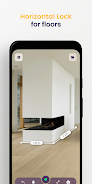
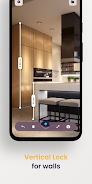
- Specialized Tools: Take advantage of specialized tools that cater to different measuring needs. Measure horizontal surfaces accurately, even with objects in the way. Measure heights using the vertical mode. Preview the size of objects, like furniture items, with the Box Preview mode. Determine angles between segments with the Angle Finder tool. And save time with Chain Measurements, allowing you to quickly start a new measurement by placing an anchor point.
- Additional Features: Automatically calculate the area of a surface and save measurements by snapping a photo directly in the app. Organize your saved measurements into folders for easy review. Share your results with colleagues and clients. Access measuring tips and tricks with helpful videos included in the app.
- User-Friendly Interface: The app doesn't require login or registration. Simply download it and start measuring right away. The app works seamlessly with both Imperial (inches, feet) and Metric (centimeters, meters) systems, catering to users worldwide.
- Privacy and Support: The app ensures your privacy with a dedicated privacy policy. For any feedback or queries, you can reach out to the team at [email protected].
Conclusion:
Measure Tools - AR Ruler App is the ultimate solution for professionals such as architects, interior designers, and construction workers, as well as anyone who needs to measure floors and objects on a daily basis. With its fast and convenient features, specialized tools, and user-friendly interface, this app allows you to take accurate measurements anytime, anywhere using just your phone. Say goodbye to lost rulers and complicated calculations. Download Measure Tools now and experience hassle-free measuring at your fingertips.