Splitgate 2 is one of the most anticipated games of 2025, a highly anticipated sequel to a beloved title. While still in Alpha, players are already experiencing the thrill of the gameplay, alongside some expected performance hiccups like crashes and frame drops. Optimizing your settings is key to maximizing your framerate and minimizing input lag, ensuring a smoother, more competitive experience. Here's how to fine-tune Splitgate 2 for optimal performance.
Recommended Videos **Related: What Is Splitgate 2’s Release Date?**
Splitgate 2 System Requirements
Before diving into optimization, ensure your system meets the minimum or recommended specifications. Fortunately, Splitgate 2 isn't overly demanding.
Minimum:
- Processor: Intel® Core™ i3-6100 / Core™ i5-2500K or AMD Ryzen™ 3 1200
- Memory: 8 GB RAM
- Graphics: NVIDIA® GeForce® GTX 960 or AMD Radeon™ RX 470
Recommended:
- Processor: Intel® Core™ i5-6600K / Core™ i7-4770 or AMD Ryzen™ 5 1400
- Memory: 12 GB RAM
- Graphics: NVIDIA® GeForce® GTX 1060 or AMD Radeon™ RX 580
Splitgate 2 Best Video Settings
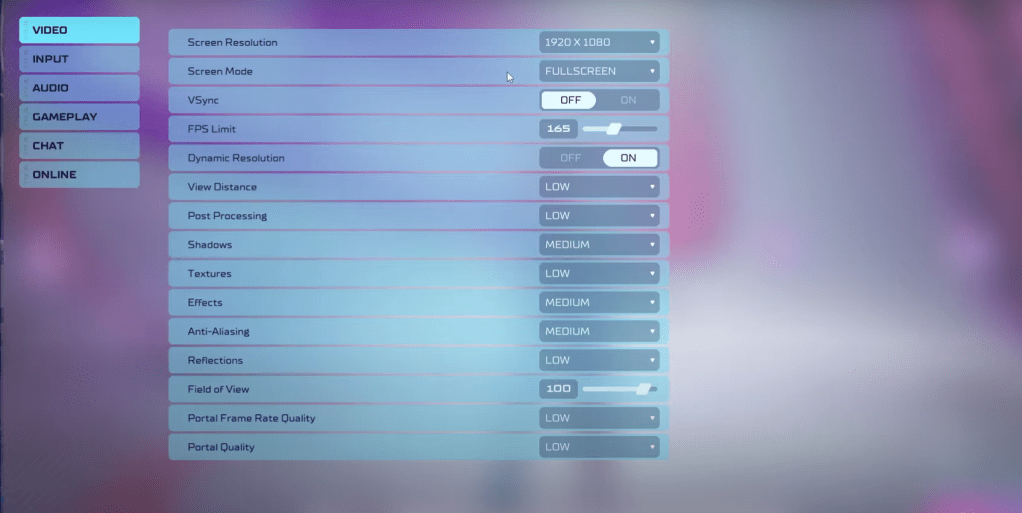
In a competitive shooter like Splitgate 2, performance trumps visual fidelity. The following settings prioritize a high framerate and responsive gameplay, even if it means sacrificing some graphical beauty.
- Screen Resolution: Your monitor's native resolution (1920x1080 is standard).
- Screen Mode: Borderless Fullscreen (for easy Alt+Tabbing) or Fullscreen.
- VSync: Off (significantly reduces input lag).
- FPS Limit: Your monitor's refresh rate (60, 144, 165, 240 Hz, etc.).
- Dynamic Resolution: On (experiment with Off; results vary by system).
- View Distance: Low
- Post Processing: Low
- Shadows: Medium (Low for older systems).
- Effects: Low
- Anti-Aliasing: Low (increase if you notice significant shimmering).
- Reflection: Low
- Field of View (FOV): Maximum (though slightly reducing it might improve performance).
- Portal Frame Rate Quality: Low
- Portal Quality: Low
Generally, prioritize the lowest settings. However, if the visuals are too jarring, consider slightly increasing Effects and Anti-Aliasing—these settings have a relatively minor performance impact. While maximizing FOV is ideal for competitive play, a slight reduction can yield notable performance gains.
Other Recommended Splitgate 2 Settings
These settings don't directly impact FPS but contribute to a better overall experience:
- Sensitivity: Adjust to your preference or use an online calculator to convert settings from other shooters.
- Audio: Lower in-game music volume to reduce distractions. Enable Windows Spatial Sound for enhanced audio cues.
By implementing these settings, you'll be well on your way to a smoother, more responsive Splitgate 2 experience.
Related: 10 of the Most Fun Games to Play With Friends